Autor da secção: Laiton Hedley
Computed Variables
Computed variables are used to transform values from the existing columns, creating new columns of data for analysis. For example, a computed column can transform responses to z-scores, or compute a total score from a number of survey items.
Values are computed using simple formulas such as:
Z(response)
Q1 + Q2 + Q3 + Q4
where
response, andQ1..Q4refer to existing columns in the data set.The simplest way to add a new computed variable to a data set is to select the
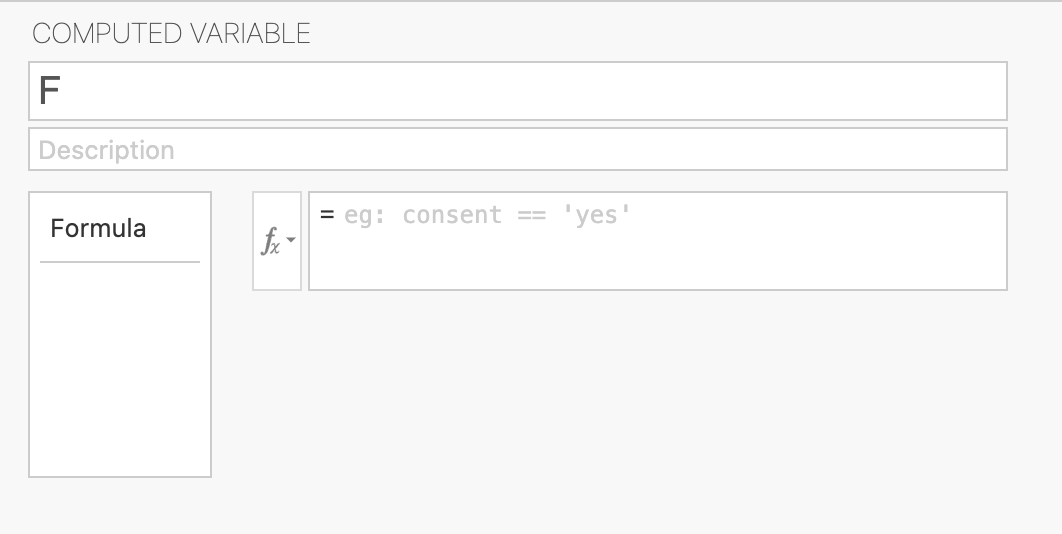
Add(variable) button from theDatatab. SelectingAppendunderComputed variableswill add a new computed column to the very right of the data set. To configure the computed variable, select eitherSetupfrom theDatatab, or double click on the column header. This will the variable editor which looks as follows (for computed variables):
Here the new column can be named and given a description. Selecting the small fx button will bring down a list of the functions available and the list of variables (these can be inserted by double-clicking them). It’s also possible to construct a formula by simply typing directly into the formula box.
A number of functions are available in jamovi, see the ⚡ List of Functions for details.
Computed variables are ideal for one-off computations, but where the same computation needs to be applied many times across many columns (For example, reverse scoring a number of responses), creating a computed variable for each column becomes tedious. In contrast,
Transformed variablesallow for the same transform to be applied across any number of columns. Further, transformed variables are ideal for «if-then» recoding of variables. See the Transformed Variables documentation for more details.