Autor des Abschnitts: Jonathon Love
1. Getting Started
Before we begin, analyses in jamovi are written in the R programming language. This tutorial assumes you have some knowledge of R, and ideally some experience in writing R packages.
That out of the way, let’s begin!
Development of modules for jamovi requires the
jmvtoolspackage. In this tutorial we will:
install
jmvtoolsensure that
jmvtoolscan find jamovibuild and install a jamovi module from GitHub
1.1. Install jmvtools
jmvtoolsis available from the jamovi repo, and can be installed in R with:install.packages('jmvtools', repos=c('https://repo.jamovi.org', 'https://cran.r-project.org'))
1.2. Check jmvtools can find jamovi
Now you have
jmvtoolsinstalled, we can check whether it can locate your jamovi installation:jmvtools::check()
jmvtoolssearches for jamovi in what might be considered ’usual places`, such as:/Applications /usr/lib/jamovi C:\Program FilesIf
jmvtoolscan’t find it, you can specify the path in the call tocheck():jmvtools::check(home='C:\\Users\\jonathon\\Documents\\jamovi')(you should substitute in your own path, unless your username is jonathon, and you’ve got jamovi in your documents folder).
If you have to specify this path, you can set this for the remainder of the session with
options():options(jamovi_home='C:\\Users\\jonathon\\Documents\\jamovi')
1.3. Install a Module
Now we have
jmvtoolsinstalled and working, we can use it to build and install a module. If you haven’t already, start up jamovi. Next we’ll download a module from GitHub, build and install it. we’ll use the Base R module – you can download it using the direct link here.Unzip the source directory and open the project file
jmvbaseR.Rprojin RStudio (or just set your working directory to the source’s directory). Now we can call theinstall()function:jmvtools::install() # not to be mistaken for devtools::install()This will build the module, and install it into jamovi.
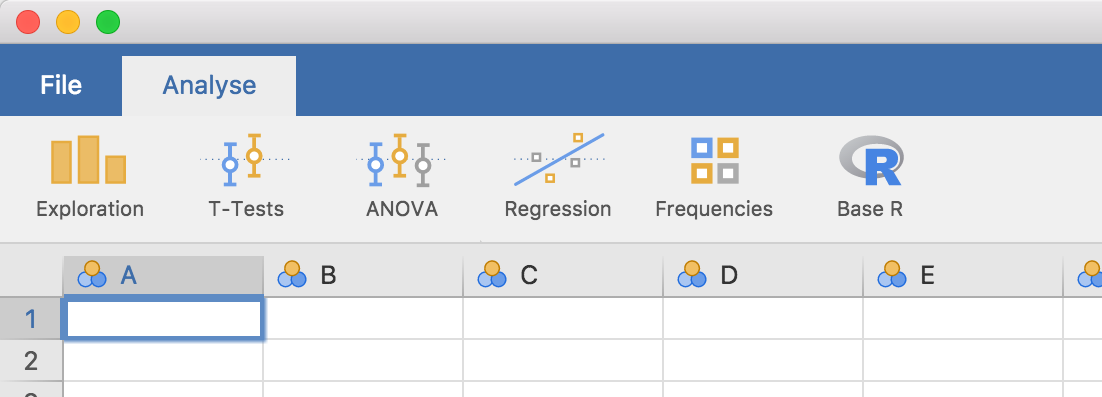
If you turn now to your open jamovi window, you’ll see a new ‘Base R’ menu has appeared on the ribbon, with a set of new analyses. The ability to install and update jamovi analyses from R turns out to be pretty nifty, because as we’ll see in the next section, we can make changes to an analysis, run
jmvtools::install()again, and immediately see those changes reflected in jamovi. This makes developing and testing jamovi analyses a breeze!